
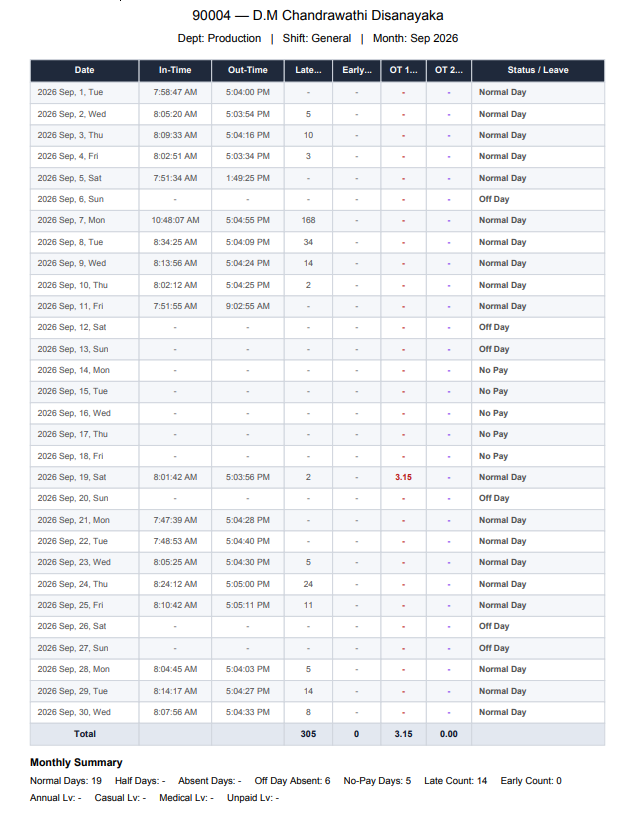
What HR should be able to see for each employee
A useful employee attendance system should show the full monthly story: scheduled date, shift, IN/OUT, work hours, late, early, overtime, no-pay and status. This makes attendance easier to explain to employees, easier to review by supervisors and easier to hand over to payroll.
Daily reports and monthly summaries
Master HR includes report views for daily attendance, employee attendance, monthly summaries, overtime, absent days, late/early information, exceptions, raw punches and more. This turns attendance from a simple clocking system into a management information source.
Why attendance finalization matters
Attendance should not keep changing while payroll is being processed. Master HR uses a finalize/lock concept so HR can complete corrections first, then hand over a reviewed period to payroll. If a correction is needed after finalization, the process can be controlled through an unlock-correct-finalize workflow.
Key capabilities
How this connects to Master HR Payroll Service
Master HR is not positioned as a collection of isolated software modules. Employee records, attendance, leave, shifts, timesheets, reports and payroll are designed to support one controlled monthly operating process. Eligible payroll-service clients receive access to the Master HR HRIS as part of the agreed service package, and applicable packages may include a biometric attendance device subject to terms.
Related Master HR solutions
Frequently asked questions
Can HR see one employee’s whole month?
Yes. Master HR provides employee-level monthly attendance views and summaries.
Can the system show late and OT?
Yes. Late, early, OT and work-hour information can be reviewed as part of attendance processing.
Can reports be exported?
Master HR supports payroll-ready reporting and export workflows depending on the agreed service scope.